



 Saif Ali Tai
In May 2026, setting up strong two-factor authentication (2FA) isn’t just a good idea; it’s a critical defense against the relentless wave of cyberattacks. This two factor authentication setup guide 2026 will walk you through securing your digital life. With AI-powered phishing and credential stuffing on the rise, relying solely on passwords is like leaving your front door unlocked. Your personal data, finances, and online identity are too valuable to leave exposed. Let’s lock them down.
📋 In This Article
Why 2FA in 2026 is Non-Negotiable

The threat landscape has evolved dramatically. We’re seeing sophisticated AI models generating hyper-realistic phishing emails and deepfake voice calls that can trick even the most vigilant users. Credential stuffing attacks, where billions of stolen username-password pairs from old breaches are tested against new accounts, remain a massive problem. Industry observers note that over 80% of data breaches still involve compromised credentials. Two-Factor Authentication adds that crucial second layer, making it exponentially harder for attackers to gain access, even if they somehow get your password. It’s the most effective, accessible security measure you can deploy right now.
The Reality of Online Threats
Every day, millions of login attempts on major platforms are malicious. Your password, no matter how complex, can be guessed, phished, or found in a breach. Without 2FA, a single compromised password means total account takeover. That’s a direct threat to your banking, email, and social media. You need more than just one key.
Choosing Your Authenticator: Hardware vs. Software
When it comes to 2FA, you generally have two main choices: software-based authenticator apps or dedicated hardware security keys. Software apps like Authy or Google Authenticator are convenient, generating time-based one-time passwords (TOTP) on your phone. They’re free and easy to set up. However, they’re still vulnerable if your phone is compromised. Hardware keys, like the YubiKey 5C NFC or Google Titan Security Key, offer superior protection, especially against phishing. They use FIDO2/WebAuthn standards, meaning the login process is cryptographically tied to the website, making phishing nearly impossible. I personally use a combination of both.
Top Software Authenticator Apps
Authy is my go-to for software 2FA. Its encrypted cloud backup means you won’t lose all your codes if you upgrade or lose your phone. Google Authenticator is simple and secure but lacks backup, which can be a real headache. Microsoft Authenticator offers convenient push notifications but uses a proprietary system for Microsoft accounts.
Setting Up 2FA on Major Platforms
Most major online services now offer robust 2FA options. The process is generally similar: head to your account’s security settings, look for ‘Two-Factor Authentication’ or ‘2-Step Verification,’ and follow the prompts. You’ll typically scan a QR code with your authenticator app or insert your hardware key. For critical accounts like your Google, Microsoft, or Apple ID, prioritize setting up the strongest possible 2FA. Many platforms now support FIDO2 directly, allowing you to use a hardware key without needing a separate app. Always ensure you save your backup codes in a safe, offline place.
Google and Apple: The Big Two
For Google, navigate to your Google Account > Security > 2-Step Verification. You can set up Google Prompts, authenticator apps, or security keys. Apple ID users go to Settings > [Your Name] > Password & Security > Two-Factor Authentication. Apple primarily uses trusted devices, but you can also set up a recovery key for extra protection.
The Best Hardware Security Keys for 2026
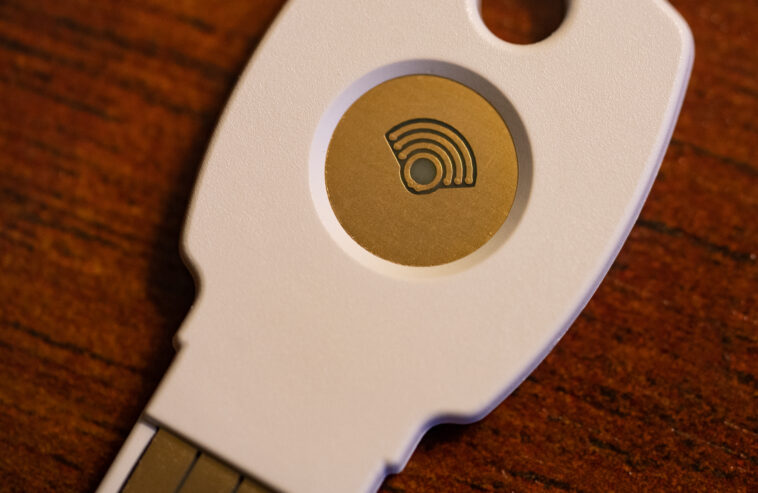
If you’re serious about security, a hardware key is essential. The YubiKey 5C NFC remains a standout, offering USB-C and NFC connectivity for both computers and modern smartphones. It supports FIDO2, FIDO U2F, PIV, OpenPGP, and TOTP, making it incredibly versatile. It typically costs around $60-$70 USD. The Google Titan Security Key is another excellent FIDO2 option, often sold in a two-key pack (USB-A and USB-C/NFC) for about $50-$60 USD. Both are fantastic choices that provide virtually unphishable login for supported sites. I’ve been using YubiKeys for years, and they’ve never let me down.
YubiKey 5C NFC: My Personal Pick
I can’t recommend the YubiKey 5C NFC enough. Its robust build quality and broad protocol support mean it works almost everywhere. The NFC feature is a game-changer for mobile logins, letting me tap my phone to log in securely. At its price point, it’s a minimal investment for maximum peace of mind.
⭐ Pro Tips
- Invest in a YubiKey 5C NFC for critical accounts; it’s $60-$70 well spent.
- Use Authy for software-based 2FA – its encrypted cloud backup saves you if you lose your phone, unlike Google Authenticator.
- Never use SMS 2FA if other options exist. SIM swapping is a real threat, and it’s far less secure than an authenticator app or hardware key.
Frequently Asked Questions
What is the most secure 2FA method in 2026?
Hardware security keys using FIDO2/WebAuthn, like a YubiKey, offer the highest protection against phishing and account takeover in 2026. They are virtually unphishable.
Is SMS 2FA still safe to use?
No, SMS 2FA is generally not recommended in 2026 due to the risk of SIM swapping attacks. Prefer authenticator apps or hardware keys for stronger security.
How much does it cost to set up strong 2FA?
Basic authenticator apps are free. A strong hardware key like the YubiKey 5C NFC costs around $60-$70, a worthwhile investment for top-tier security.
Final Thoughts
Securing your online presence with robust 2FA isn’t just a technical chore; it’s a fundamental aspect of digital citizenship in 2026. Don’t wait until you’re a victim of a data breach. Take control of your security today by implementing these steps. Start with your most critical accounts – email, banking, social media – and expand from there. Your future self will thank you for taking this seriously. Get your accounts locked down now.




GIPHY App Key not set. Please check settings