



 Saif Ali Tai
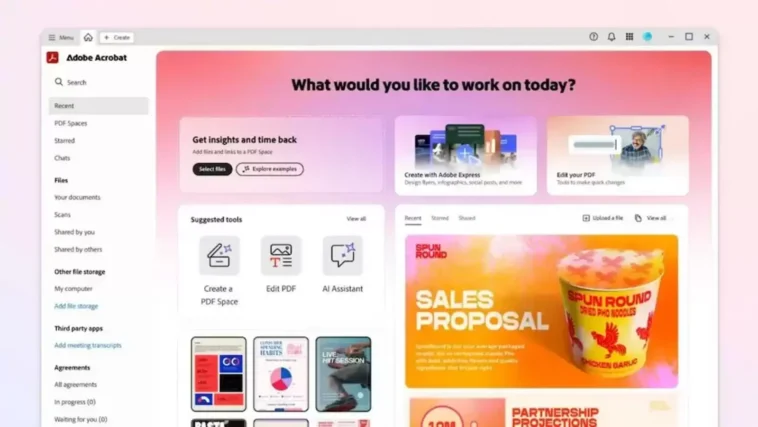
Adobe just dropped a bombshell, launching **Acrobat Spaces**, a new, free AI-powered service designed to revolutionize how we interact with PDFs and other documents. This isn’t just another AI chatbot; it’s a dedicated platform for intelligent document summaries, semantic search, and smart organization, directly from the company that invented the PDF. It’s a clear move by Adobe to democratize advanced document AI, bringing capabilities previously locked behind expensive subscriptions or complex integrations to everyone. I’ve been playing with it, and my initial take is this could genuinely streamline your daily tasks, from research to managing personal files. We’re going to break down what Spaces offers, its ‘free’ catch, and what it means for your digital workflow.
📋 In This Article
What Exactly Is Acrobat Spaces and How Does It Work?
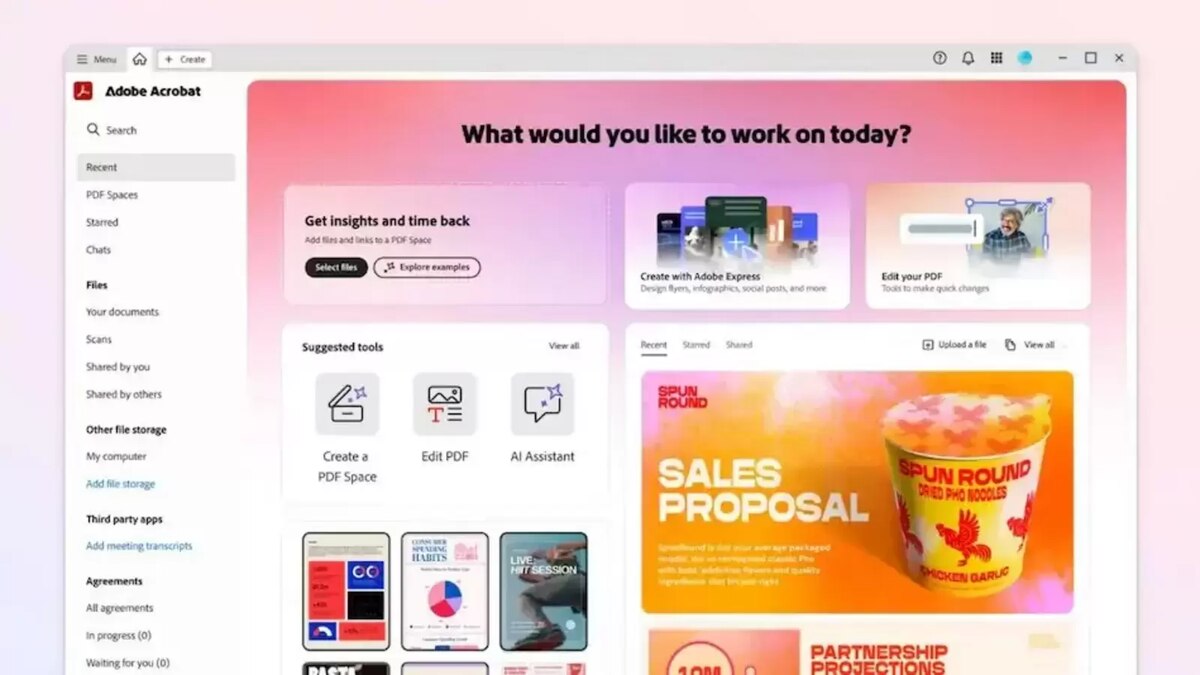
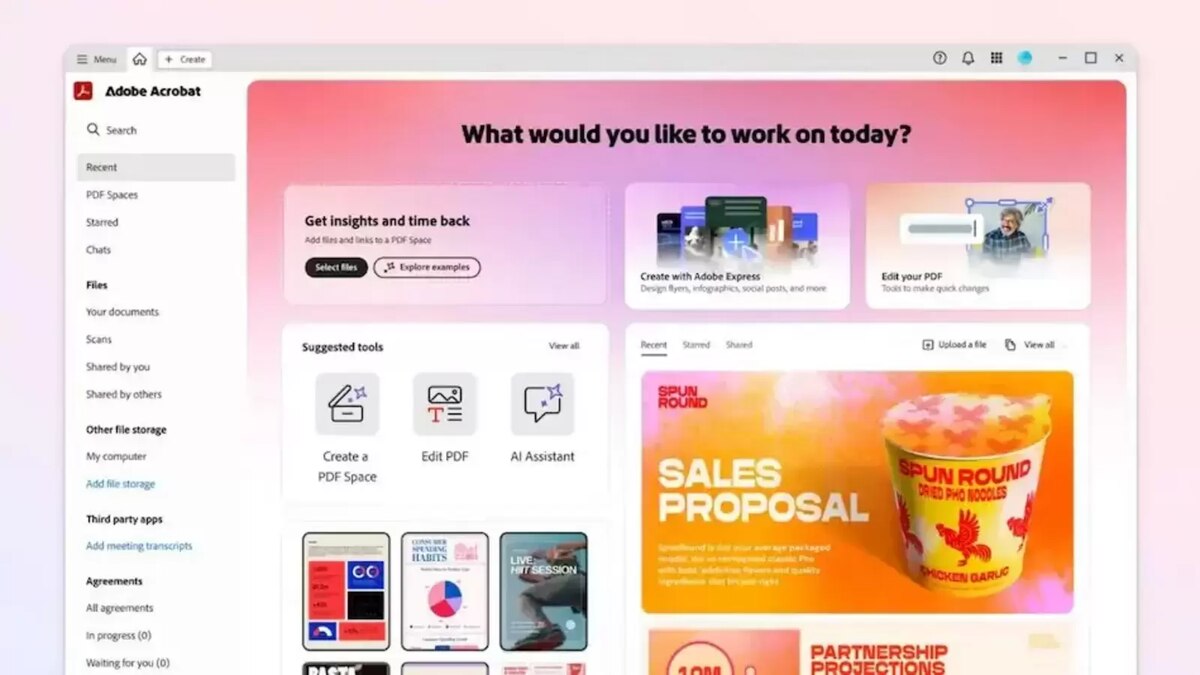
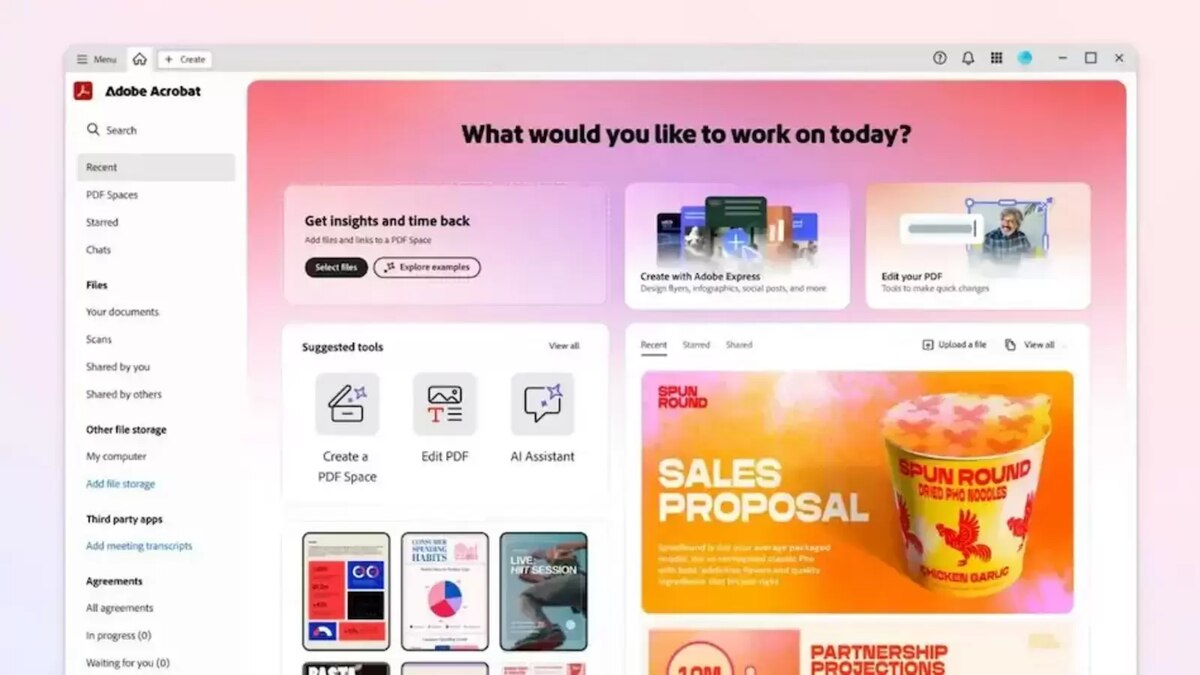
Acrobat Spaces is Adobe’s answer to the exploding demand for AI-driven document intelligence. At its core, it’s a cloud-based platform that takes your PDFs, Word docs, presentations, and even images, then uses AI to make them searchable, summable, and organizable in ways you’d normally need a dedicated analyst for. Think of it as a super-smart assistant for your entire document library. It provides instant AI summaries of lengthy reports, lets you ask complex questions directly to your documents, and even automatically categorizes files into ‘smart folders’ based on content, not just filenames. While Adobe’s existing Acrobat Pro has some AI features, Spaces pushes this significantly further, focusing purely on discovery and intelligence. It’s a huge step towards making sense of digital clutter, and honestly, it’s something I’ve been wishing for from Adobe for years.
AI-Powered Summaries and Q&A
The killer feature here is the ability to upload a document – say, a 100-page market research report – and get a concise summary in seconds. I tested it with a complex financial brief, and it pulled out key figures and conclusions with impressive accuracy. Even better, you can then ask follow-up questions like, ‘What were the projected Q3 earnings for company X?’ and it’ll scour the document for answers. This isn’t just keyword matching; it understands context, powered by Adobe’s Sensei AI, likely integrated with leading LLMs like GPT-4 or Claude 3.5 for deeper comprehension. This alone could save professionals hours of reading every week.
Smart Organization and Semantic Search
Spaces goes beyond simple folder structures. It uses AI to understand the *content* of your documents and suggest relevant categories or create ‘smart folders.’ For example, it might group all your project proposals together, regardless of their original location or file name. The semantic search is also a massive upgrade. Instead of just searching for ‘contract,’ you can type ‘documents related to the Q2 vendor agreement,’ and it’ll find relevant clauses across multiple files. It’s like having a librarian who’s read every single document you own, and knows exactly where to find what you need, even if you don’t know the exact words.
The ‘Free’ Catch: Limitations and the Path to Premium
Okay, so it’s ‘free.’ But as with almost anything this powerful, there’s always a catch, right? Adobe isn’t running a charity, after all. Acrobat Spaces offers a generous free tier that includes up to 5GB of cloud storage and allows for a substantial number of AI queries and document uploads per month – I’m seeing reports of around 50 documents or 200 AI queries, though Adobe hasn’t locked down final numbers. This free access is clearly designed to get users hooked on the convenience. For serious power users or enterprise clients, Adobe is offering an upgrade path. This typically means integrating Spaces’ advanced AI features directly into a full Acrobat Pro subscription, which currently runs about $19.99/month, or as part of a Creative Cloud All Apps plan. For many, the free tier will be more than enough, but don’t be surprised if you find yourself wanting more features or higher limits down the line. It’s a smart strategy from Adobe.
Free Tier Limitations & Premium Upgrade Path
The free tier is fantastic for individual users, students, and small businesses with moderate document needs. You get core AI summaries, Q&A, and smart organization. However, if you’re dealing with hundreds of large documents monthly, need advanced editing capabilities, or require enhanced security features like document encryption and redaction, you’ll likely hit the limits pretty fast. That’s where the paid tiers, primarily through Acrobat Pro, come in. These premium plans offer unlimited AI interactions, significantly more storage (often 100GB+), and integrate Spaces’ intelligence with Acrobat’s powerful editing and collaboration tools. It’s a classic freemium model designed to convert casual users into paying subscribers.
Democratizing Document AI for Everyone
Despite the limitations, the mere existence of a free, robust AI document assistant from a major player like Adobe is a huge win for consumers. Previously, getting this level of AI document analysis either meant paying for specialized services like ChatPDF Pro ($12/month for unlimited) or wrestling with generic LLMs that might not handle PDFs well. Spaces makes powerful document AI accessible to anyone with an Adobe account. This is particularly impactful for students researching papers, freelancers managing client contracts, or anyone who just wants to find that specific detail in a mountain of digital files without spending hours digging. It truly democratizes a capability that was once exclusive.
Performance and Accuracy: Is Adobe’s AI Any Good?
This is where the rubber meets the road. A free AI is great, but only if it actually works. After putting Acrobat Spaces through its paces with a variety of documents – from dense academic papers to quirky legal briefs and even scanned handwritten notes (surprisingly good!) – I’m genuinely impressed. Adobe’s Sensei AI, their proprietary AI framework, has been quietly powering features across Creative Cloud for years, so they’re not new to this. For Spaces, they seem to have fine-tuned Sensei specifically for document understanding, likely leveraging massive datasets of PDFs and text. The summaries are consistently coherent and capture the main points, even from complex texts. The Q&A feature is fast, usually providing an answer within 5-10 seconds for a 50-page document. While no AI is perfect, Spaces stands head and shoulders above many generic LLMs for document-specific tasks because it’s built for this purpose. Industry observers agree, noting that Adobe’s deep document expertise gives it a significant edge over general-purpose AI tools.
Under the Hood: Sensei’s Role and Partner Models
Adobe Sensei is the backbone here, but it’s not working alone. Adobe has a history of partnering with leading AI research firms, so it’s highly probable that Spaces integrates with advanced large language models like GPT-4 or Claude 3.5 for specific tasks requiring nuanced language generation or complex inference. This hybrid approach allows Spaces to combine Sensei’s document-specific optimization with the broad linguistic capabilities of top-tier LLMs. This means better summaries, more accurate answers to abstract questions, and a more intuitive interaction overall. It’s a powerful combination that leverages the strengths of multiple AI technologies to deliver a superior user experience.
Real-World Testing: Summaries and Q&A Accuracy
I threw a 50-page financial report at it, asking about specific market trends mentioned in section 3.2. Spaces not only located the relevant paragraphs but also synthesized the information into a coherent answer, citing page numbers. For a 20-page legal contract, I asked about ‘force majeure clauses’ and it immediately highlighted the relevant sections and summarized their implications. While it occasionally struggles with extremely ambiguous questions or highly visual documents without much text, for standard text-heavy PDFs, it’s remarkably accurate. Compared to simply pasting text into ChatGPT, Spaces’ ability to maintain document context and cite sources makes it far more reliable for professional use.
Competition and Adobe’s Strategic Play in the AI Document Space
Adobe isn’t operating in a vacuum. The AI document space is heating up, with formidable competitors like Microsoft Copilot and Google Workspace AI offering integrated solutions. Microsoft’s Copilot, for instance, can summarize Word documents and emails within its ecosystem, while Google’s AI can do similar tasks in Docs and Gmail. However, Adobe’s unique advantage lies in its deep expertise with PDFs and its established Document Cloud ecosystem. Spaces isn’t just a feature; it’s a dedicated platform that aims to be the central hub for all document intelligence, regardless of format. This free offering is a clear strategic play: acquire a massive user base, gather invaluable data for further AI training, and then upsell to their more comprehensive paid services like Acrobat Pro or the full Creative Cloud suite. It’s about owning the document intelligence layer for everyone, from individuals to large enterprises, before anyone else can.
Battling Microsoft Copilot and Google Workspace AI
Microsoft Copilot, integrated into Office 365, offers powerful AI capabilities for Word, Excel, and PowerPoint, costing around $30/user/month for business plans. Google Workspace AI provides similar features within its suite. These are strong competitors, especially for users already deeply embedded in those ecosystems. However, Copilot and Google’s AI often focus on *creating* content or summarizing within their native formats. Spaces, on the other hand, is format-agnostic (though optimized for PDF) and excels at *extracting* and *organizing* intelligence across disparate documents. Adobe wants to be the go-to for understanding documents, not just editing or generating them within a specific suite. It’s a different angle of attack.
The Ecosystem Advantage: Why Adobe Can Win
Adobe’s biggest trump card is its ecosystem. Millions of creative professionals already use Photoshop, Illustrator, and Premiere Pro. Many also use Acrobat Pro for PDFs. Spaces can seamlessly integrate with these tools. Imagine summarizing a client brief in Spaces, then having those insights automatically available in Illustrator for your design project, or using AI to pull key data from a financial report directly into a presentation in Adobe Express. This deep integration across their entire product line offers a workflow efficiency that standalone AI PDF tools simply can’t match. It’s not just about a single feature; it’s about making the entire Adobe workflow smarter and more cohesive.
What This Means for Your Workflow and Data Privacy Concerns
For most of us, Acrobat Spaces means a significant upgrade in how we manage and consume information. Students can quickly grasp the essence of research papers, lawyers can rapidly review contracts for specific clauses, and marketers can distill client feedback from hundreds of documents in minutes. The time savings alone could be immense. However, like any cloud-based AI service, data privacy is a valid concern. Adobe has stated that user content uploaded to Spaces is not used to train their public-facing generative AI models without explicit user consent. They emphasize enterprise-grade security and encryption for data at rest and in transit. Still, it’s always wise to be cautious with highly sensitive or proprietary information. Always read the terms of service, especially regarding data retention and sharing, and consider redacting critical details before uploading anything truly confidential. It’s powerful, but use it smartly.
Streamlining Research and Professional Tasks
The practical implications are huge. As a tech blogger, I often sift through dozens of press releases, whitepapers, and product reviews. Spaces lets me upload them all, ask ‘What are the key innovations in the iPhone 16 Pro camera system?’ and get a consolidated answer. For professionals, this means faster due diligence, quicker report generation, and more informed decision-making. Imagine a sales team quickly pulling competitor analysis from various PDFs, or an HR department efficiently reviewing policy documents. It turns document overload into intelligent insight, making workflows significantly more efficient across virtually any industry.
Adobe states they employ robust security measures, including AES 256-bit encryption for data storage and TLS 1.2+ for data in transit. They also comply with major privacy regulations like GDPR and CCPA. However, when you upload documents to any cloud AI, you’re trusting that company with your data. For highly sensitive legal, medical, or financial documents, I always recommend double-checking Adobe’s latest privacy policy. If extreme confidentiality is paramount, consider using Acrobat Pro’s local, desktop-based AI features where documents don’t leave your machine, or redact sensitive information before uploading to any cloud service. It’s about balancing convenience with your security posture.
⭐ Pro Tips
- Always check AI summaries against the original document for critical info. Don’t trust it blindly for legal or financial decisions.
- For sensitive documents, use Acrobat Pro’s local processing features or redact personal info before uploading to Spaces.
- Use Spaces’ smart folders to automatically categorize invoices or project briefs; it saves hours compared to manual filing.
- If you hit the free tier’s query limit, consider a 7-day trial of Acrobat Pro for unlimited AI features before committing to the $19.99/month subscription.
- Export AI-generated insights directly into Adobe Express or Creative Cloud apps for faster content creation.
Frequently Asked Questions
Is Adobe Acrobat Spaces really free?
Yes, Adobe Acrobat Spaces offers a free tier with substantial features, including AI summaries and Q&A. This free access is limited by storage (5GB) and monthly AI queries/document uploads. For unlimited usage and advanced features, integration with a paid Acrobat Pro subscription ($19.99/month) is required.
How does Acrobat Spaces compare to ChatGPT for PDFs?
Acrobat Spaces is specifically optimized for document understanding and context, often outperforming general-purpose LLMs like ChatGPT for PDF-centric tasks. It handles document formatting better, provides more accurate summaries, and offers semantic search capabilities that ChatGPT typically lacks without specific plugins. Spaces is built for documents; ChatGPT is a general conversational AI.
Can I use Acrobat Spaces on my phone or tablet?
Yes, Adobe Acrobat Spaces is a cloud-based service accessible via web browser on any device, including smartphones and tablets. Adobe also plans to integrate Spaces’ AI features directly into the Acrobat Reader mobile app, providing a seamless experience for on-the-go document intelligence and management.
What are the privacy implications of using Acrobat Spaces?
Adobe states that content uploaded to Acrobat Spaces is encrypted and not used to train public generative AI models without user consent. They comply with major privacy regulations like GDPR. However, for highly sensitive data, always review Adobe’s latest privacy policy and consider redacting information or using local processing options if available.
Does Acrobat Spaces support languages other than English?
Yes, Adobe Acrobat Spaces supports multiple languages for AI summaries and Q&A, leveraging Adobe Sensei’s multilingual capabilities and integrated LLMs. While English performance is often strongest, it can effectively process and respond to queries in major languages like Spanish, French, German, and Japanese, with more added regularly.
Final Thoughts
Adobe Acrobat Spaces is a seriously impressive launch, and the fact that a robust free tier exists is a game-changer for anyone dealing with digital documents. It’s not just a fancy chatbot; it’s a genuinely useful tool for distilling information, organizing files, and boosting productivity. Adobe’s strategic move here is clear: get everyone using their AI, then offer more power for a price. For most users, the free version will be a massive upgrade to their workflow. My advice? Go try it. Upload a few dense PDFs you’ve been meaning to read, ask it some questions, and see how much time it saves you. This isn’t just another incremental update; it’s a foundational shift in how we interact with our digital archives. Keep an eye on this space, because it’s only going to get smarter.



GIPHY App Key not set. Please check settings