



 Saif Ali Tai
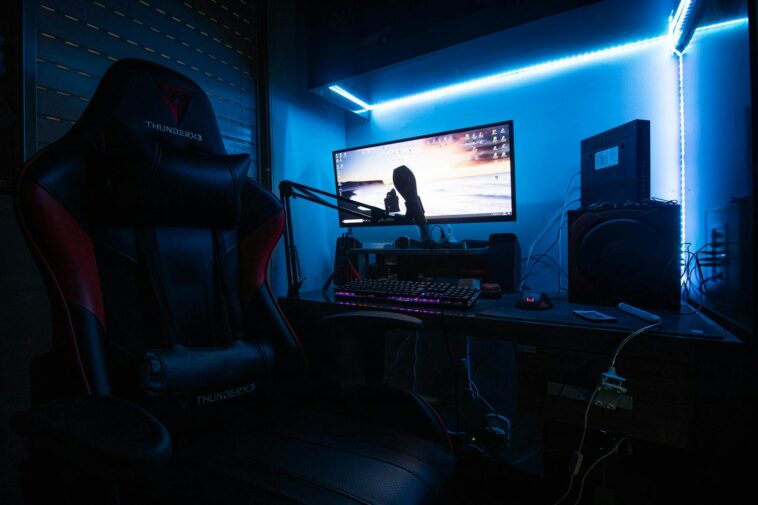
Last winter, my PC was shoved under my bed, my monitor on a wobbly IKEA Lack table, and my Steam library felt like a digital garage sale. I was sick of it. So I took my 8×10 foot boxroom—a literal storage closet with a window—and built a proper gaming spot. No, it’s not a ‘man cave’ with a 75-inch OLED. It’s a cozy, functional nest where I’ve logged 200 hours in Elden Ring and a dozen indie gems. And it didn’t cost a fortune. This is my no-BS guide for beginners. I’ll show you exactly what I bought, what I skipped, and how to make your tiny space feel like it was made for gaming. Forget generic advice. This is the real stuff.
📋 In This Article
- First, Stop Guessing and Actually Measure Your Space
- The $800 Gaming PC That Actually Fits in a Boxroom
- Seating: The One Thing You Shouldn’t Cheap Out On
- Audio: Don’t Be That Guy Blasting Speakers at 2AM
- Lighting: Kill the Harsh Overhead Glare
- Organizing Your Steam Library (Yes, It’s Part of the Room)
- ⭐ Pro Tips
- ❓ FAQ
First, Stop Guessing and Actually Measure Your Space
Seriously. Get a tape measure. My boxroom is 96 inches wide and 120 inches long. That’s it. Before you buy a single thing, you need to know your exact dimensions. Measure for desk depth, chair clearance, and where your feet will land. I learned this the hard way after ordering a 30-inch deep desk that left me with 18 inches of knee room—unacceptable. Also, check your power outlets. I have one on the back wall, which meant my PC and monitor had to share a single surge protector. That’s fine, but it dictated my cable management plan. And look up. Is there a ceiling fan? A low-hanging light? I had to remove a bulky globe fixture to get my headroom. Don’t assume. Measure, sketch it out on paper, and live with that reality. Your cozy dream starts with cold, hard numbers.
The 3-Foot Rule for Chair and Desk Clearance
You need at least 3 feet (36 inches) from the back of your chair to the wall or any obstruction. Less than that and you’ll feel claustrophobic every time you stand up. I have 38 inches and it’s tight but workable. If you have less, consider a wall-mounted fold-down desk. They’re not just for tiny houses anymore.
Find Your ‘Tech Triangle’
Plot your PC, monitor, and primary input (keyboard/mouse) on your sketch. This is your active zone. Keep it clean and within arm’s reach. My PC sits on the floor under the desk (it’s a large Fractal Design Meshify C case, which is fine). My monitor is on a $25 AmazonBasics riser. Everything I touch is within 24 inches. That’s the goal.
The $800 Gaming PC That Actually Fits in a Boxroom
You don’t need a $2,000 rig. For 1080p gaming, which is perfect for a small room with a 24-27 inch monitor, a smart $600-$800 build is golden. I went with a Ryzen 5 5600G for its integrated graphics initially, then added a used RX 6600 for $120 on eBay six months later. Total system cost: $650. It runs Cyberpunk 2077 at 60fps on Medium with FSR 2.1. It’s silent. And it’s tiny in my Corsair 4000D Airflow case. For beginners, I strongly recommend a pre-built from a reputable builder like iBuyPower or NZXT BLD if you’re scared of building. Their $700-$900 ‘Steam Deck competitor’ rigs are solid. But if you want to learn, the Ryzen 5600 + a last-gen GPU like an RTX 3060 or RX 6600 is the sweet spot. Avoid the latest RTX 4060—it’s not a huge leap for the price right now.
My Exact $650 Budget Build List (2026 Prices)
CPU: AMD Ryzen 5 5500 ($85 used). Mobo: B550M DS3H ($80). RAM: 16GB DDR4-3200 ($35). GPU: AMD Radeon RX 6600 ($120 used). SSD: 1TB NVMe ($60). PSU: 650W 80+ Bronze ($60). Case: Deepcool MATREXX 40 ($50). Total: ~$490. Add a $60 Windows key and you’re at $550. I spent more on a better CPU cooler (Thermalright Peerless Assassin, $35) because my boxroom gets warm. That’s the build.
Why an APU-First Build is Smart for Small Spaces
Start with a CPU that has good integrated graphics, like the Ryzen 5 5600G. Game at 720p-900p while you save for a GPU. It’s a perfect placeholder. I played Stardew Valley, Hades, and older Assassin’s Creed titles for months on the Vega 7 iGPU. No need for a discrete card immediately. It saves heat, noise, and money in your cramped boxroom.
Seating: The One Thing You Shouldn’t Cheap Out On
Your back will hate you if you use a dining chair. I tried. For two weeks, my lower back was in knots. I bit the bullet and bought a refurbished Secretlab Titan Evo for $350. It’s the best money I’ve ever spent on this setup. For a tighter budget, the $150 Autonomous ErgoChair is decent. But honestly, a proper ergonomic office chair matters more than a ‘gaming’ chair with a stupid wings. Look for adjustable lumbar support, seat depth, and armrests. My chair takes up space, but it’s worth every inch. Measure your room’s depth again. You need room for the chair to recline slightly without hitting the wall. I have 4 inches of clearance. It’s nerve-wracking but works.
The ‘Kneeling Chair’ Trap (Avoid It)
Those weird saddle chairs look cool and save space. Don’t. I borrowed one from a friend for a day. My knees were bruised, and my posture was awful for long sessions. They’re for short tasks, not 3-hour Elden Ring runs. Stick with a traditional chair that has a proper backrest.
Chair Mat? Yes, Even on Carpet
Get a $20 plastic chair mat. Rolling your chair over carpet is a workout and destroys cheap chair wheels. It also defines your ‘zone’ visually. My black mat makes the gaming area feel separate from the storage boxes in the corner.
Audio: Don’t Be That Guy Blasting Speakers at 2AM
In a boxroom, sound travels. I have a roommate. I learned this the hard way after a loud 10pm session in Dead by Daylight. Headphones are non-negotiable for me now. I use a $70 Superlux HD 681 EVO with a $30 FiiO E10K DAC/amp. It sounds incredible and isolates sound great. For wireless, the $100 Logitech G435 is a solid budget option, though I prefer wired for latency. If you *must* have speakers, get a pair of small, powered bookshelf speakers like the Edifier R1280T ($100) and keep the volume reasonable. But honestly, in a tiny room, a good pair of closed-back headphones is the play. Your neighbors (and roommate) will thank you.
The $30 DAC Upgrade That Actually Matters
Your motherboard’s audio output is often noisy. A cheap USB DAC like the Apple USB-C Dongle ($9) or the FiiO E10K cleans up the sound dramatically. It’s a night-and-day difference for headphone clarity. Plug it in, set it as your default device, and you’re done.
Mic Solution for Co-op Without a Boom Arm
I use a $50 Antlion ModMic 5 clipped to my headphones. No desk real estate needed. It’s a tiny magnetic mic that attaches to any headset. Way better than a standalone mic that takes up space. If you’re on a budget, the $20 V-Moda Boom Pro is a fantastic clip-on alternative.
Lighting: Kill the Harsh Overhead Glare
That single overhead light in your boxroom? It’s your enemy. It creates glare on your screen and makes your room feel like an interrogation chamber. I removed the main bulb and went fully indirect. My secret: a set of $25 Govee LED strip lights stuck to the back of my desk and the top of my monitor, set to a warm 2700K. It creates a soft bias light that reduces eye strain. I also have a $15 small desk lamp with an adjustable arm aimed at the wall for task lighting when I need to see my keyboard. No RGB rainbow nonsense. Just warm, diffused light. It makes the room feel bigger and cozier. And it’s all controlled by a cheap $20 smart plug so I can turn it on with my phone from my chair.
Bias Lighting 101: The Secret to Less Eye Strain
Put a light source *behind* your monitor, pointing at the wall behind it. This creates a gentle glow that reduces the contrast between your bright screen and the dark room. It’s scientifically proven to reduce eye fatigue. I use 5 meters of warm white LEDs. Costs $20. Do it.
Smart Bulbs vs. LED Strips: Which Actually Saves Space
Skip the bulky smart bulbs in a small room. They often need a hub. Get a set of color-changing LED strips and a $15 Bluetooth controller. They stick anywhere, take zero floor space, and you can change colors with your phone. I have mine on a schedule to turn on at sunset automatically. It’s lazy and brilliant.
Organizing Your Steam Library (Yes, It’s Part of the Room)
A messy digital library feels chaotic. I spend 10 minutes every Sunday using Steam’s ‘Hide Game’ feature and creating custom categories ( ‘Platinum’, ‘To Play’, ‘Abandoned’). It’s mental hygiene. Physically, I keep a 2TB external SSD ($120 on sale) on my desk for games I’m actively playing. My 1TB internal NVMe is for the OS and must-play titles. When I finish a game, I move it to the external drive. This keeps my PC boot drive clean and my Steam library view manageable. Use the ‘Steam Grid’ view with custom artwork from SteamGridDB. It makes browsing your library a visual joy instead of a text list. A tidy library = a tidy mind, especially in a small space.
The External SSD Trick for Instant Space Management
Moving games between drives takes seconds with Steam. I have a 2TB Samsung T7 Shield ($130). When I’m done with a 50GB game, I right-click > Properties > Move Install Folder. Bam, freed up space. No need to buy a bigger internal drive. This is the pro move for small builds.
Steam Grid View + Custom Art = Instant Mood
Install the ‘Steam Grid’ plugin from the Steam Workshop. Then, download custom box art from SteamGridDB. It makes your library look like a physical shelf. It’s pure aesthetic dopamine and takes 20 minutes to set up. Your cozy room should please your eyes, even when you’re just browsing.
⭐ Pro Tips
- Use a $20 under-desk drawer from Amazon to stash cables, a spare mouse, and snacks. It’s a game-changer for floor space.
- Score a used 27-inch 144Hz monitor for $150 on Facebook Marketplace. Look for models like the Acer Nitro VG271. Avoid 4K for small rooms—1080p or 1440p is plenty at 24-27 inches.
- Build your PC first, *then* buy your desk. You need to know the exact dimensions of your case and monitor to get desk depth right. I measured my case (18 inches deep) and added 6 inches for the monitor. Got a 24-inch deep desk. Perfect.
- The biggest beginner mistake? Buying a giant L-shaped desk. In a boxroom, you want a simple rectangular desk, 48-60 inches wide. More surface area is not better if it eats your whole room.
- The one thing that made the biggest difference for me? A proper power strip with individual switches ($25). I can turn off my PC, monitor, and lights with one flick, no crawling under the desk.
Frequently Asked Questions
How much does a decent gaming PC cost for a small room?
A solid 1080p rig is $600-$800 new. Used, you can build for $450. I recommend a Ryzen 5 5600G or 5500 + RX 6600/RTX 3060 combo. Don’t overspend—your room size doesn’t need a 4K monster.
What size monitor is best for a tiny game room?
24-27 inches. 1080p at 24 inches is sharp. 1440p at 27 inches is the sweet spot. Avoid 32+ inches—it’ll overwhelm your space and force you to sit too far back.
Is a gaming chair worth it for a boxroom?
Yes. A proper ergonomic chair is worth every penny. I bought a refurbished Secretlab Titan Evo for $350 and my back pain vanished. A $50 office chair from Staples will ruin your posture. Don’t cheap out here.
How do I hide all the cables in a small space?
Use a $15 cable sleeve and a $10 under-desk tray. Run all cables through the sleeve, then into the tray. It’s a 30-minute job that makes the room look 10x cleaner. Also, use Velcro straps, not zip ties.
Can I have a good gaming setup in a room with no window?
Yes, but lighting is critical. Use bias lighting (LED strips behind monitor) to reduce eye strain. Get a daylight-balanced (5000K) desk lamp for tasks. Avoid harsh overhead lights. It’s totally doable.
Final Thoughts
Look, your boxroom isn’t a limitation—it’s a constraint that forces smart choices. I didn’t buy a $500 chair or a $1,000 PC. I measured, I prioritized the chair and GPU, and I killed the ugly overhead light. My total cost was about $800, including the PC, monitor, chair, and all the little bits. It’s cozy, it’s functional, and it’s mine. Stop dreaming about a massive basement setup. Measure your actual space tonight. Buy a tape measure, not a graphics card. Start with the room’s dimensions, then fill it with purpose. Your Steam library deserves a proper home, even if it’s a closet.




GIPHY App Key not set. Please check settings